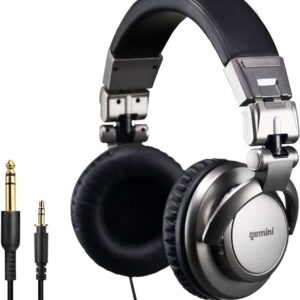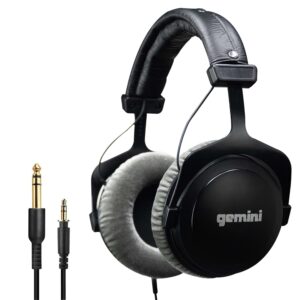


Studio headphones for gaming are often overlooked in favor of flashy headsets marketed specifically to gamers. But when it comes to positional accuracy, tonal balance, and long‑session comfort, studio headphones can outperform many traditional gaming models.
Most gaming headsets emphasize boosted bass and exaggerated spatial effects. That tuning can feel exciting at first, but it can also blur directional cues and mask subtle in‑game details. Studio headphones approach sound differently. They prioritize balance, clarity, and controlled imaging.
The real question is not whether studio headphones can be used for gaming. It is whether they provide a more reliable reference for competitive play and immersive experiences.
In this guide, we break down how studio headphones perform in gaming environments, what features actually matter, how they compare to gaming headsets, and how to choose the right setup for PC or console use.
If you care more about accuracy than artificial enhancement, this is where to start.
Are Studio Headphones Good for Gaming?
Yes, they can be. In some scenarios, they are better than traditional gaming headsets.
The key is understanding what “better” actually means.
Studio headphones are not built for gaming aesthetics or bundled software features. They are built for accuracy. That focus on accuracy happens to address several problems serious gamers care about.
They typically provide:
- More precise positional cues
- Cleaner separation between footsteps, dialogue, and environmental effects
- A balanced frequency response that avoids exaggerated bass masking subtle detail
In competitive titles, boosted bass can blur directional information. Heavy digitalprocessing can widen sound artificially but reduce clarity. Studio headphones tend to present audio more honestly, which can improve spatial awareness over time.
There are tradeoffs.
Most studio headphones do not include:
- A built‑in microphone
- Onboard EQ software or surround presets
- Integrated volume and chat controls
They are tools rather than all‑in‑one gaming systems.
If your priority is competitive precision, natural imaging, and long‑term comfort, studio headphones are often the smarter choice. If you want plug‑and‑play simplicity and integrated communication features, a gaming headset may be more convenient.
The better option depends on whether you value control or convenience.
Studio headphones can be excellent for gaming when positional accuracy and tonal balance matter more than built‑in features. They prioritize clarity over exaggerated bass and artificial surround effects.
Studio Headphones vs Gaming Headsets
The difference between studio headphones and gaming headsets is not just branding. It is tuning philosophy and design purpose.
Gaming headsets are typically built for convenience and immersion. Studio headphones are built for accuracy and tonal balance.
Here is how they compare in practical terms.
Sound Tuning
Gaming headsets often emphasize bass and high frequencies. This creates an exciting, cinematic sound profile. However, exaggerated bass can mask subtle in‑game details such as distant footsteps or environmental movement.
Studio headphones usually maintain a more neutral frequency response. This helps preserve clarity across the full range, especially in the midrange where positional cues often sit.
Positional Accuracy
Many gaming headsets rely on virtual surround processing. This can widen the sound artificially but may reduce precision.
Studio headphones depend on natural stereo imaging. When the tuning is balanced, positional cues can feel more realistic and controlled rather than exaggerated.
For competitive gaming, controlled imaging often matters more than dramatic width.
Microphone and Features
Gaming headsets usually include:
- Built‑in microphones
- Chat mix controls
- Software EQ profiles
- Surround presets
Studio headphones typically include none of these features. You will need an external microphone and separate controls.
The tradeoff is simplicity versus flexibility.
Comfort and Build
Both categories can be comfortable, but gaming headsets often prioritize lighter materials and integrated features. Studio headphones may feel more minimal and durable, especially in professional models.
Comfort ultimately depends on clamping force, pad material, and weight distribution rather than category alone.
Which Is Better?
If you value plug‑and‑play simplicity, integrated communication, and aesthetic features, a gaming headset is often easier.
If you prioritize tonal accuracy, controlled imaging, and long‑term listening consistency, studio headphones can offer a more disciplined experience.
The better choice depends on whether you want convenience or control.
Key Features That Matter for Gaming
Gaming rewards precision. The features that matter are not always the ones advertised on the box.
Imaging and Positional Accuracy
This is the most important factor for competitive gaming.
Imaging refers to how clearly a headphone places sounds within the stereo field. Good imaging allows you to:
- Identify direction immediately
- Estimate distance with confidence
- Separate overlapping audio elements such as footsteps, gunfire, and dialogue
When imaging is vague, you hesitate. You hear movement but cannot place it precisely. In fast‑paced titles, that uncertainty directly affects reaction time.
Wide soundstage alone is not enough. Controlled, accurate spatial placement matters more than exaggerated width.
Latency and Connection Type
Latency is the delay between the moment audio is generated in the game and when you hear it. In technical terms, this is known as audio latency, which measures the time difference between signal creation and playback.
For competitive play, latency should be as low as possible.
The most reliable options are:
- Wired 3.5 mm connections
- USB connections with stable drivers
- Direct connection to the console or PC
Bluetooth introduces transmission delay. Wireless transmission standards and codec specifications are documented by the Bluetooth SIG.
In casual gaming, this may feel minor. In competitive environments, even small delays can:
- Disrupt timing cues
- Reduce reaction accuracy
- Break immersion during fast sequences
Consistency is more important than convenience when precision matters.
Comfort for Long Sessions
Gaming sessions are rarely short.
Two hours can easily become four. Physical discomfort accumulates gradually and affects focus before you realize it.
Look for:
- Moderate clamping force that maintains seal without pressure
- Breathable ear pad materials that limit heat buildup
- Balanced weight distribution across the head
Excessive pressure or heavy designs increase fatigue. Fatigue reduces concentration. Reduced concentration impacts performance.
Comfort is not cosmetic. It supports sustained awareness.
Open Back vs Closed Back for Gaming
Acoustic design changes the experience significantly.
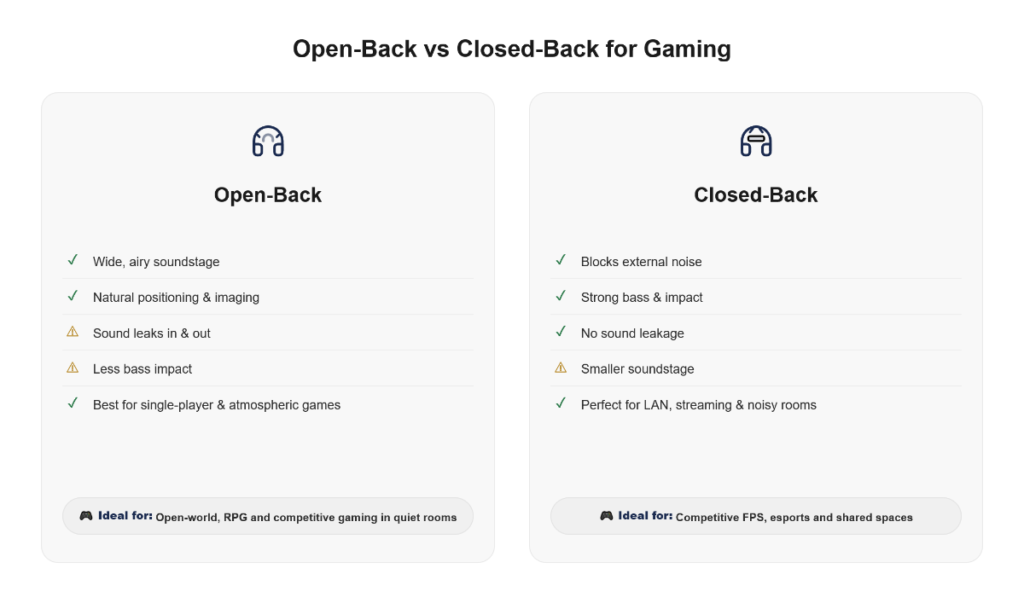
Open‑back headphones often provide:
- Wider perceived soundstage
- More natural spatial presentation
- Improved positional clarity in quiet environments
If you want a deeper look at how open designs affect spatial accuracy, read our open-back studio headphones guide.
However, they:
- Leak sound outward
- Allow external noise to enter
Closed‑back headphones offer:
- Stronger isolation
- Better containment in shared or noisy spaces
- Slightly more perceived bass presence
For setups that require isolation, see our best closed-back studio headphones overview.
The tradeoff is typically a narrower soundstage and less airy spatial presentation.
If you game in a quiet room and prioritize spatial awareness, open‑back designs can be advantageous. If background noise is present or you share space with others, closed‑back models are more practical.
Choose based on environment, not ideology.
Do You Need an Amp for Gaming?
In most setups, no.
But the answer depends on the headphones you are using and how they are connected.
If your headphones fall within a low to moderate impedance range, typically between 16 and 80 ohms, and have reasonable sensitivity, most PCs and modern consoles can drive them adequately.
Problems usually appear when you pair higher impedance or lower sensitivity headphones with weak outputs.
If the device cannot supply enough voltage or current, you may notice:
- Lower maximum volume
- Softer or less controlled bass
- Reduced dynamic impact
- A sense that detail is restrained
This does not mean the headphone is unsuitable for gaming. It means the source is limiting performance.
For most gamers using standard motherboard audio or controller outputs, choosing easier‑to‑drive headphones avoids unnecessary complications.
An external DAC or audio interface becomes useful when:
- Using higher impedance models
- You want cleaner amplification
- You notice distortion or noise at higher volumes
For competitive gaming, stability matters more than raw loudness. If your headphones reach comfortable levels without strain, an additional amplifier is not mandatory.
Match the power requirement to your setup, not the other way around.
Best Studio Headphones for Gaming by Budget
The right studio headphone for gaming depends less on brand and more on how accurately it presents spatial information. Below is a practical breakdown based on real‑world performance rather than marketing positioning.
Under $100
| Model | Design | Why It Works for Gaming |
|---|---|---|
| Audio‑Technica ATH‑M40x | Closed | Balanced sound with controlled bass and clear mids |
| Superlux HD681 | Semi‑open | Surprisingly wide stage at a low price |
| Samson SR850 | Semi‑open | Strong positional imaging for budget setups |
At this level, the focus is on value. You may not get extreme refinement, but you can achieve clearer positional awareness than many entry‑level gaming headsets.
Best suited for beginners or casual competitive play.
$100–300
| Model | Design | Why It Works for Gaming |
|---|---|---|
| Beyerdynamic DT 770 Pro (80Ω) | Closed | Detailed presentation with strong isolation |
| Sennheiser HD 560S | Open | Neutral tuning and accurate spatial placement |
| AKG K702 | Open | Expansive soundstage for directional cues |
This range offers a noticeable improvement in clarity and control. Imaging becomes more precise, and tonal balance remains stable during long sessions.
Ideal for serious gamers and hybrid users who switch between gaming and content creation.
High-End ($300+)
| Model | Design | Why It Works for Gaming |
|---|---|---|
| Beyerdynamic DT 1990 Pro | Open | Exceptional detail and imaging precision |
| Sennheiser HD 600 / 650 | Open | Natural tonal balance with disciplined mids |
| Audeze LCD‑2 | Planar | Deep, controlled bass with clean separation |
High‑end models can deliver exceptional spatial realism and micro‑detail retrieval. However, they often require stronger amplification and a quiet environment to perform at their best.
These are best suited for competitive players or professionals who value accuracy over convenience.
Studio headphones are not designed specifically for gaming, but when chosen carefully, they can provide a more controlled and realistic experience than many feature‑heavy gaming headsets.
For broader comparisons across categories and use cases, see our complete best studio headphones guide.
PC vs Console Compatibility
Not all gaming setups are equal. The way studio headphones connect to a PC is often different from how they connect to a console.
Understanding those differences prevents unnecessary frustration.
3.5 mm Analog Connection
The 3.5 mm jack is the most universal option.
It works with:
- PC motherboard outputs
- Laptop headphone jacks
- Console controllers
- Audio interfaces
The strength of this connection depends entirely on the device providing power.
On a well‑designed PC output or interface, performance can be stable and controlled. On a weaker source, the same headphone may sound underpowered.
The connector is not the limitation. The output stage behind it is.
USB Connection
USB headphones or external USB DACs bypass the device’s internal audio hardware.
For PC users, this often results in:
- Cleaner signal conversion
- More stable amplification
- Reduced background noise
A USB DAC can be especially useful when using higher impedance headphones that demand more voltage than a standard motherboard output can provide.
Audio Interfaces and External DACs
For PC setups, adding an external DAC or audio interface is often the most reliable upgrade.
It provides:
- Stronger output power
- Better control over gain levels
- More consistent sound quality
This is particularly helpful for users running headphones above 80 ohms or those who notice distortion at higher volumes.
Console Controller Output Limits
Console controllers, especially on PlayStation and Xbox, typically provide limited output power through their built‑in 3.5 mm jacks.
With demanding headphones, you may notice:
- Lower maximum volume
- Reduced dynamic impact
- Softer bass response
This does not mean studio headphones are unsuitable for consoles. It means the controller output may not be sufficient for higher impedance models.
In these cases, using a separate DAC or amplifier connected directly to the console can restore proper headroom and control.
The key difference between PC and console compatibility is flexibility.
PC setups allow easier integration of external DACs and interfaces. Console setups often require more careful matching of impedance and sensitivity to avoid underpowered sound.
Match your headphones to the device’s output capabilities, not just the connector type. For a broader breakdown of how studio headphones behave across different devices, see our guide to studio headphones for PC, Mac and phones.
Common Mistakes Gamers Make
Most performance issues gamers blame on equipment are actually tuning and setup mistakes.
Here are the ones that matter most.
Chasing Excessive Bass
This is one of the most common mistakes.
Heavy bass tuning may feel powerful, but it often masks critical midrange information. In competitive titles, boosted low frequencies can:
- Blur subtle footsteps
- Overpower directional cues
- Reduce clarity in complex scenes
Bass should support the experience, not dominate it. Competitive performance benefits more from controlled low end than exaggerated impact.
Ignoring Latency with Wireless Connections
Wireless audio is convenient, but latency is real.
Even modest delay can:
- Disrupt timing cues
- Slightly offset audio feedback
- Affect reaction consistency in fast exchanges
In casual play, this may not matter. In competitive environments, predictable timing is more important than cable‑free convenience.
If precision matters, wired connections remain the safer choice.
Overlooking the Microphone Setup
Switching to studio headphones usually means losing the built‑in microphone found on gaming headsets.
Ignoring this can lead to poor communication quality, inconsistent voice levels, or reliance on low‑quality onboard mics.
Common solutions include:
- A dedicated USB microphone
- An attachable boom microphone such as a ModMic
- A full audio interface with XLR mic setup
Clear communication is part of competitive performance. Audio clarity alone is not enough if teammates cannot hear you properly.
Most gaming mistakes are not about the headphones themselves.
They come from focusing on excitement instead of accuracy, or convenience instead of control.
Frequently Asked Questions
Are studio headphones better than gaming headsets?
They can be, depending on what you value.
For tonal accuracy, positional precision, and controlled imaging, studio headphones often have an advantage. For built‑in microphones, chat controls, and plug‑and‑play simplicity, gaming headsets are usually more convenient.
The better choice depends on whether you prioritize competitive precision or integrated features.
Do I need surround sound for gaming?
Not necessarily.
Well‑tuned stereo imaging is often more reliable than virtual surround processing. Artificial surround can widen the soundstage but sometimes reduces clarity and positional precision.
In many competitive titles, accurate stereo presentation is more important than expanded spatial effects.
Can I use open‑back headphones for FPS games?
Yes, especially in quiet environments.
Open‑back designs often provide a wider and more natural soundstage, which can improve directional awareness. However, they allow external noise in and leak sound outward.
If you game in a noisy space or share a room, closed‑back models may be more practical.
Why do footsteps sound clearer on studio headphones?
Studio headphones typically avoid heavy bass boosts and exaggerated tuning. That allows subtle midrange and high‑frequency details, such as footsteps or distant movement, to remain clear.
Excessive low‑end emphasis can mask these details and reduce spatial precision.
Is wireless good for competitive gaming?
Wireless can be convenient, but it introduces latency and compression.
In casual play, this may not matter significantly. In competitive environments where reaction timing is critical, wired connections provide more predictable performance.
If consistency and low delay are priorities, wired setups remain the safer choice.
For a deeper analysis of latency, codecs, and wireless tradeoffs, see our wireless studio headphones guide.
Conclusion
Most gaming headsets are designed to impress immediately. Studio headphones are designed to present sound with control and balance.
That distinction shapes the experience.
If your priority is accurate positional audio, clear separation of in‑game elements, and long‑term listening consistency, studio headphones can offer a more disciplined approach to gaming sound.
They are not built around RGB lighting, surround presets, or bundled microphones. They are built around tuning accuracy and spatial realism.
That comes with tradeoffs. You may need a separate microphone. You may need to pay attention to amplification and connection type. Convenience is not always the focus.
But if competitive clarity and controlled imaging matter to you, the benefits can outweigh the added setup.
Gaming is not only about what you see on the screen.
It is also about how precisely you interpret what you hear.
Choose the tool that supports your priorities, not the one that markets the loudest features.

A passionate tech blogger and the founder of Best Tech View, a dynamic platform dedicated to all things technology. With a keen interest in the tech, Ahmad strives to provide insightful and engaging content on the latest tech trends, and breakthroughs.