

Studio headphones for PC, Mac and phones are often chosen for the wrong reasons.
People compare brand names, read spec sheets, and assume that if a headphone is labeled professional, it will perform equally well on any device. That assumption breaks down quickly in real use.
A pair that sounds balanced and controlled through a dedicated audio interface can feel quiet or unstable when plugged directly into a laptop. A model that performs well on a desktop setup may struggle on a phone with limited output power. The difference is not marketing. It is electrical compatibility.
Studio headphones for PC editing, Mac production, and mobile monitoring behave differently depending on impedance, sensitivity, and the quality of the device driving them. If the source cannot deliver adequate power or a clean signal, even a well‑designed headphone will not reach its potential.
Most buying mistakes happen here. The headphone gets blamed for what is actually a signal chain problem.
This guide explains how studio headphones interact with different devices, when built‑in DACs make sense, where Bluetooth fits in, and how to match your headphones to your real workflow.
The goal is not to chase specifications.
It is to build a setup that works consistently with the gear you already use.
Why Compatibility Matters More Than Brand
Brand reputation is easy to compare. Compatibility is not.
Most people assume that a higher‑end headphone will automatically perform better, regardless of what it is connected to. In reality, the device driving the headphone often has a bigger impact than the logo on the ear cup.
A well‑engineered studio headphone paired with a weak laptop output can sound flat, thin, or underpowered. The same model connected to a capable audio interface can feel controlled, dynamic, and balanced.
The result has less to do with branding and more to do with electrical matching.
Output power, impedance, sensitivity, and digital‑to‑analog conversion all shape what you hear. When these elements are misaligned, even an expensive headphone can perform below its potential.
Compatibility determines whether the headphone works as intended in your environment.
For a broader technical foundation, see our complete guide to studio headphones.
Brand tells you about build quality and tuning philosophy. Compatibility determines whether that tuning reaches your ears accurately.
If you ignore compatibility, you are choosing based on reputation.
If you understand compatibility, you are choosing based on performance.
That distinction matters.
Who This Guide Is For
This guide is for people who rely on headphones as part of their workflow, not just for background listening.
If you regularly switch between devices, move between tasks, or depend on consistent monitoring, compatibility stops being a minor detail and becomes a practical requirement.
You will benefit from this guide if you:
- Work on a PC for editing, production, or hybrid creative tasks Use a
- Mac for music production or content creation
- Record, monitor, or edit directly from a phone or tablet
- Care about positional accuracy in gaming but also value tonal balance
- Edit dialogue and need reliable midrange clarity
- Monitor your own voice while podcasting or streaming
- Travel and need dependable performance without carrying extra gear
The objective is simple. Remove guesswork.
By the end, you should understand how to match studio headphones to your actual devices and avoid paying for performance your setup cannot deliver.
Can You Use Studio Headphones with Any Device
Short answer: yes.
Better answer: not without tradeoffs.
Most studio headphones are physically compatible with common devices. The plug fits. The sound plays. That part is easy.
The real question is whether the device can drive the headphone properly.
For a comparison of popular models across different setups, our best studio headphones guide breaks down practical options.
Studio headphones behave differently depending on output power, impedance matching, and the quality of the digital‑to‑analog conversion. A headphone may function on a phone or laptop and still fail to deliver the control or clarity it is capable of.
Here are the most common connection scenarios.
3.5 mm Analog Jack
This is the most universal connection. It works with PCs, laptops, many phones using adapters, and audio interfaces.
The limitation is not the connector. It is the output stage behind it.
Laptop headphone outputs vary widely in power and noise floor. Some are clean and stable. Others introduce hiss, distortion at higher volumes, or weak low frequency control when paired with higher impedance headphones.
The connection works. The performance depends on the hardware driving it.
USB Connection with Built‑In DAC
Some studio headphones connect via USB and include an internal DAC and amplifier.
This bypasses your device’s internal audio hardware and can provide more consistent output, especially on budget laptops or desktops. In controlled scenarios, this can improve clarity and reduce noise.
The tradeoff is flexibility. You are locked into the headphone’s internal conversion and amplification design. In fixed studio setups, many creators prefer using a dedicated audio interface instead.
Audio Interface
For serious production work, an audio interface is the reference standard.
It provides cleaner digital‑to‑analog conversion, stronger amplification, and better gain control. It also integrates with microphones, monitors, and recording software in a predictable way.
If your workflow involves recording, mixing, or long sessions of detailed editing, an interface is usually the most stable solution.
Bluetooth
Bluetooth adds convenience but introduces variables.
Latency can affect timing when recording or gaming. Compression may alter fine detail. Battery life adds another layer of dependency.
For casual listening, editing drafts, or travel, Bluetooth can be practical. For critical monitoring and precise decision‑making, wired connections remain more reliable.
Anchor example:
The official Bluetooth SIG documentation provides technical details on codec behavior if you want to explore the specifications further.
The key point most people miss is this:
Compatibility is not the same as performance.
A headphone might technically work with your device and still operate below its potential. The goal is not just connection. The goal is controlled, predictable sound across your workflow.
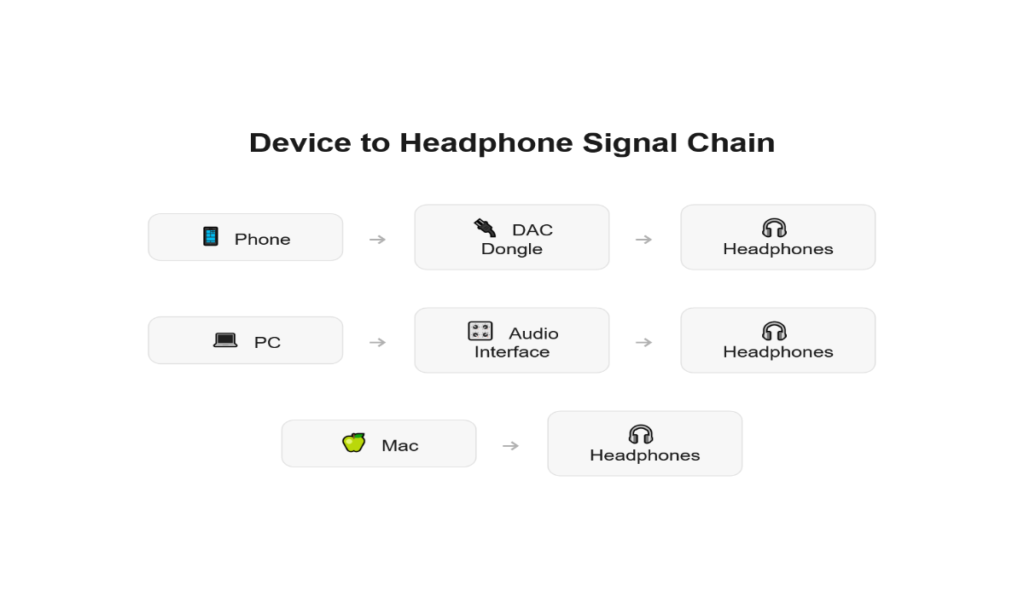
This visual illustrates typical signal flow between devices and studio headphones.
Using Studio Headphones with a PC
A PC is one of the most common monitoring sources, and also one of the most misunderstood.
Impedance and Output Power
Most desktop and laptop PCs are not designed with strong headphone amplification stages. The 3.5 mm output is often built for convenience, not precision.
If you plug high‑impedance headphones, such as 250 ohms or higher, directly into a standard motherboard output, you may notice:
- Lower than expected volume
- Softer low‑end impact
- Reduced dynamic range
- A generally restrained or flat presentation
This does not automatically mean the headphone is weak. It often means the PC cannot supply enough voltage to drive it properly.
For PC use without an external interface or amplifier, headphones in the 32 to 80 ohm range are typically safer. They reach comfortable levels without strain and maintain more consistent control.
Motherboard Audio Limitations
Built‑in motherboard audio varies widely in quality.
Under light listening conditions, it may sound acceptable. Under heavier workloads, such as gaming, streaming, or video rendering, noise floor and output consistency can become more noticeable.
Common limitations include:
- Background hiss at higher volumes
- Limited headroom
- Reduced clarity at louder playback levels
These issues become more obvious when you move from casual listening to critical tasks like editing dialogue or balancing a mix.
When a USB DAC or Audio Interface Makes Sense
If you experience:
- Low volume even at maximum settings
- Audible noise or interference
- Compressed or dull sound
Then the limitation is likely the output stage, not the headphone.
A USB DAC or dedicated audio interface bypasses the motherboard’s internal audio system. It provides cleaner digital‑to‑analog conversion and stronger amplification. The improvement is often less about loudness and more about control, separation, and stability.
For creators who regularly edit, record, or mix on a PC, an interface is not a luxury. It is a stability upgrade.
Gaming and Editing on the Same PC
Many PC users switch between gaming, editing, and streaming on the same machine. That hybrid workflow changes priorities.
Gaming benefits from spatial awareness and directional accuracy. You want clear positional cues and a sense of depth.
Editing and production demand tonal balance. Exaggerated bass or hyped highs may feel exciting in games but distort judgment during dialogue editing or mixing.
A studio headphone suited for PC use should prioritize:
- Controlled bass rather than boosted low end
- Clear and natural midrange
- Sufficient spatial detail without artificial widening
The goal is balance.
A headphone tuned purely for excitement may impress in games but compromise editing accuracy. A strictly analytical model may feel less dramatic but translate better across tasks.
Choose based on the work you actually do most often.
Using Studio Headphones with a Mac
Mac computers have a reputation for stronger built‑in audio than many standard PCs. In recent years, some Mac models have even included higher voltage headphone outputs capable of driving moderately high‑impedance headphones.
That is the good news.
The limitation is still context.
Built‑In Headphone Output
Modern Macs can often handle headphones in the 32 to 150 ohm range comfortably, and in some cases even higher. However, “able to drive” does not always mean “operating at full potential.”
With higher impedance models, you may still notice:
- Reduced headroom at louder levels
- Slight compression in dynamic passages
- Less authority in low frequencies
For casual editing or monitoring, the built‑in output may be sufficient. For precision mixing or extended sessions, the difference between adequate and optimal becomes more noticeable.
USB‑C Adapters and Dongles
Many Mac setups rely on USB‑C ports. If your model lacks a dedicated 3.5 mm headphone jack, you will need an adapter or external DAC.
Not all adapters are equal.
Low‑cost dongles can introduce noise, limit output power, or reduce overall clarity. A well‑designed USB DAC dongle, on the other hand, can provide cleaner conversion and more stable output than the built‑in audio stage.
If your workflow is mobile and lightweight, a quality USB DAC dongle can be a practical middle ground between built‑in audio and a full interface.
Pairing with an Audio Interface
For serious production work, an external audio interface remains the most consistent solution.
An interface provides:
- Dedicated digital‑to‑analog conversion
- Stronger and more predictable amplification
- Better integration with microphones and studio monitors
This becomes especially important for:
- Music production
- Detailed video editing
- Podcasting and voice monitoring
- Long mixing sessions
The Mac’s built‑in audio can be surprisingly capable. But when precision and repeatability matter, a dedicated interface still offers greater control.
The question is not whether a Mac can run studio headphones.
The question is whether you want adequate performance or stable, professional monitoring.
Apple provides technical details on headphone output specifications for certain Mac models in its official support documentation.
Studio Headphones for iPhone and Android
Phones are the most constrained source in this entire discussion.
Not because they sound bad, but because they are built for efficiency, not high‑power monitoring.
The Dongle Reality
Most modern iPhones and many Android devices no longer include a dedicated 3.5 mm headphone jack. That means you are relying on:
- A Lightning adapter
- A USB‑C adapter
- Or an external USB DAC
The critical detail is this: the adapter is not just a connector. It contains a DAC and a small amplifier.
And not all of them are equal.
Some low‑cost dongles provide limited output power and introduce measurable noise. Others are surprisingly clean and capable. The quality of that tiny device directly affects what your headphones can deliver.
Power and Sensitivity
Phones are not designed to drive demanding headphones.
If you connect a high‑impedance or low‑sensitivity model, you may experience:
- Limited maximum volume
- Reduced dynamic punch
- Softer bass control
- A sense that the sound lacks authority
This does not mean the headphone is poorly tuned. It often means the phone cannot provide enough voltage or current.
Impedance matters, but so does sensitivity. A 32 ohm headphone with low sensitivity can struggle just as much as a higher impedance model.
For consistent mobile performance, headphones in the 16 to 32 ohm range with moderate to high sensitivity are usually the safest choice.
When a USB‑C DAC Makes Sense
A small external DAC connected via USB‑C or Lightning can dramatically improve stability and headroom.
It can:
- Deliver stronger, cleaner output
- Reduce distortion at higher volumes
- Improve channel separation
- Provide more consistent performance across apps
For mobile creators who record, edit, or monitor audio on the go, this is often the most cost‑effective upgrade in the entire signal chain.
It does not turn a phone into a studio interface. But it reduces the weakest link in the chain.
The key takeaway is simple.
Studio headphones can work with iPhone and Android devices. But performance depends heavily on output power and conversion quality. Choose accordingly.
Studio Headphones for Gaming
Gaming deserves its own detailed discussion so that this section will stay focused on compatibility rather than rankings or specific models. Read our full guide to studio headphones for gaming for deeper analysis of imaging and latency.
When using studio headphones for gaming on a PC, a few factors matter more than branding:
- Low latency, especially for competitive titles
- Accurate positional cues rather than exaggerated bass
- Clear midrange for footsteps, dialogue, and environmental detail
- Comfort during long sessions
Studio headphones often avoid the heavy bass boosts and artificial spatial processing common in many gaming headsets. That can result in more natural imaging and cleaner positional accuracy.
The tradeoffs are practical rather than acoustic. Most studio headphones do not include built‑in microphones, RGB lighting, or onboard software profiles. You may need a separate mic if you stream or use voice chat regularly.
If gaming is your primary focus, see our full guide to studio headphones for gaming for a deeper analysis of soundstage, latency, and competitive performance.
Studio Headphones with Built‑In Microphones
Not all studio headphones include microphones. Most traditional studio models are designed purely for monitoring and do not prioritize voice capture.
However, some users prefer an all‑in‑one setup, especially for:
• Gaming with voice chat
• Streaming
• Remote meetings
• Hybrid creator workflows
When a Built‑In Mic Makes Sense
If you use your PC for both content creation and communication, a built‑in microphone can simplify your setup. Fewer cables. Fewer devices. Less desk clutter.
For casual streaming or team communication, integrated microphones are often sufficient.
When an External Mic Is Better
For serious recording, podcasting, or professional voice work, external microphones still offer better clarity, control, and placement flexibility.
A built‑in mic sits close to the ear cup, not your mouth. That limits tonal control and positioning accuracy.
The tradeoff is simple:
Convenience versus precision.
If voice quality matters more than simplicity, separate devices usually win.
Studio Headphones for Video Editing and Production
Video editing is less about impact and more about precision.
Dialogue Clarity
Most video projects are driven by voice. Interviews, narration, streaming content, documentaries — if dialogue is unclear, the entire project suffers.
Studio headphones for video editing should prioritize:
- Clean and natural midrange
- Controlled bass that does not mask speech
- Enough detail to reveal subtle mouth noise or background hiss
When midrange is recessed or bass is exaggerated, you may compensate incorrectly. Dialogue can end up too sharp, too thin, or overly processed when played back on speakers.
Clarity in the mids is non‑negotiable.
Sync and Timing Accuracy
Video editing also demands timing accuracy.
When aligning dialogue, effects, or music to picture, even small perception shifts can matter. Bluetooth latency may not seem dramatic, but it can distort your sense of alignment and timing.
For editing and production work, wired connections remain the safer and more predictable choice.
Stability is more important than convenience.
Low Distortion Monitoring
Distortion hides problems instead of exposing them.
A reliable studio headphone should allow you to:
- Detect clipping early
- Notice background noise in quiet scenes
- Hear compression artifacts
- Identify subtle level imbalances
These details often go unnoticed on casual listening devices but become obvious during professional review.
For video production, the goal is not dramatic sound. It is controlled, repeatable monitoring that translates beyond your editing timeline.
Studio Headphones for Podcasting and Streaming
Podcasting and streaming are less about excitement and more about control.
When you are monitoring your own voice in real time, small tonal shifts become obvious. If the midrange is unclear or the bass is exaggerated, you may compensate unconsciously and alter your delivery.
Vocal Monitoring
For podcasting, midrange clarity matters more than extreme low end extension or sparkling highs.
You want headphones that:
- Present your voice naturally
- Reveal background noise and plosives
- Avoid masking speech with heavy bass
If your headphones flatter your voice too much, you may miss problems that listeners will notice immediately.
Comfort and Session Length
Podcast and streaming sessions often run long. Two hours can easily become four.
Clamp force, ear pad material, and heat buildup affect concentration. Discomfort leads to rushed decisions and inconsistent monitoring levels.
Comfort here is not optional. It protects focus.
Isolation and Leakage
If you are recording with a microphone in the same space, sound leakage matters. Even moderate bleed can be captured by sensitive condenser microphones.
Closed‑back designs are usually the safer option for this reason. They reduce leakage and allow lower monitoring levels.
For a deeper breakdown of microphone pairing, room considerations, and headphone recommendations, see our full guide to studio headphones for podcasting.
Portable and Travel‑Friendly Studio Headphones
Portability is not just about size. It is about how the headphone behaves outside a controlled studio environment.
Working from a café, plane, hotel room, or temporary setup changes priorities. Stability, isolation, and physical durability become more important than maximum soundstage width.
What Portability Actually Means
A travel‑friendly studio headphone should:
- Fit easily into a bag without stressing the headband
- Maintain structural integrity after repeated folding or packing
- Deliver consistent sound even in noisy environments
Compact does not automatically mean practical. A fragile foldable hinge can fail faster than a solid non‑folding design. Durability still matters.
Key Features to Look For
Foldable design
Useful when space is limited, but hinge quality should be inspected carefully. Moving parts introduce wear points.
Lightweight construction
Extended wear during travel can cause fatigue quickly. Balanced weight distribution matters more than raw weight alone.
Short or detachable cable
Long cables create clutter in tight spaces. Detachable cables also reduce the risk of permanent damage if the cord is pulled accidentally.
Effective isolation
Airplanes, trains, and public environments introduce background noise. Good passive isolation often matters more than absolute tonal neutrality in these scenarios.
The Trade‑Offs
Portable studio headphones often sacrifice some perceived soundstage in favor of containment and durability. Closed‑back designs dominate this category for practical reasons.
The goal is not perfection. It is controlled performance under imperfect conditions.
If your workflow regularly shifts between fixed studio and mobile environments, you may need to accept compromises or maintain separate setups.
Portability is about minimizing friction, not maximizing specs.
Built‑In DAC and USB Studio Headphones
USB studio headphones with built‑in DACs are often misunderstood.
When you connect a USB headphone, you are not just changing the cable. You are bypassing your computer or phone’s internal audio hardware and using the headphone’s own digital‑to‑analog converter and amplifier.
In some cases, that is a meaningful improvement.
When an Integrated DAC Helps
A built‑in DAC can make sense if:
- Your laptop has a noisy or weak headphone output
- You work from multiple devices and want consistent sound
- You prefer a simple, plug‑and‑play setup without extra gear
Because the DAC and amplifier are matched to the driver internally, performance can be stable and predictable across different systems.
For beginners or mobile creators, this simplicity is valuable.
Where the Limitations Appear
However, integrated systems come with constraints.
- You cannot upgrade the amplification stage.
- Cannot adjust output characteristics beyond what the internal design allows.
- You are tied to USB power and routing.
In more complex setups, that lack of flexibility becomes noticeable.
When an External Audio Interface Is Better
A dedicated audio interface still offers advantages when you need:
- Higher and more stable output power
- Multiple inputs and outputs
- Independent gain control
- Integration with microphones and studio monitors
For production, recording, and long mixing sessions, an interface provides more control over the entire signal chain.
Built‑in DAC headphones prioritize convenience and consistency.
Audio interfaces prioritize flexibility and control.
Neither is universally better. The right choice depends on how complex your workflow actually is.
Bluetooth Studio Headphones
Wireless audio is convenient. There is no denying that.
For travel, casual listening, and switching quickly between devices, Bluetooth simplifies the setup. No cable management. No physical tether. Less friction.
But convenience introduces variables.
Latency
Bluetooth transmission adds delay. Sometimes it is small enough that you barely notice it during general playback. Other times, especially in gaming or editing environments, even slight latency can distort your perception of timing.
When aligning dialogue to video, syncing sound effects, or monitoring in real time, predictable timing matters more than mobility.
Latency does not make Bluetooth unusable. It makes it less reliable for precision work.
Compression and Codec Limits
Bluetooth audio is typically compressed before transmission. The codec used, such as SBC, AAC, aptX, or LDAC, determines how much data is preserved.
If you want a deeper explanation of how codecs and transmission methods affect audio quality, see our guide to Bluetooth technology.
Higher‑quality codecs reduce audible loss, but compression still exists. Fine details, subtle spatial cues, and low‑level artifacts may not translate exactly as they would over a wired connection.
For reviewing content or casual editing passes, this may be acceptable. For final mixing decisions, it introduces uncertainty.
When Bluetooth Makes Sense
Bluetooth studio headphones can work well for:
- Reviewing edits away from the desk
- Travel monitoring
- Draft content checks
- Hybrid creator setups where mobility matters
In these contexts, consistency and convenience outweigh absolute precision.
When to Avoid It
For tasks that demand accuracy and repeatability, wired connections remain the safer choice:
- Mixing and mastering
- Recording and real‑time monitoring
- Detailed dialogue editing
- Competitive gaming where timing matters
Wireless is a tool. Wired is still the reference.
For a deeper breakdown of wireless performance tradeoffs, see our wireless studio headphones guide.
The right choice depends on how critical the listening task is at that moment.
How to Choose the Right Studio Headphones for Your Setup
The right headphone depends less on price and more on the device driving it.
Before comparing models, define your setup clearly. Power source, portability, and workflow determine what will actually perform well.
If You Use Only a Laptop
If your laptop is your primary device and you are not using an external interface, power becomes the limiting factor.
In this scenario:
- Headphones in the 32 to 80 ohm range are generally the safest choice
- Moderate to high sensitivity helps maintain usable volume
- USB headphones with integrated DACs can bypass weak onboard audio
Avoid high‑impedance models that demand more voltage than your laptop can supply. Even a well‑tuned 250 ohm headphone may sound restrained without proper amplification.
Keep the signal chain simple and stable.
If You Use an Audio Interface
Once you introduce a dedicated audio interface, the power limitation largely disappears.
Interfaces typically provide:
- Stronger and cleaner amplification
- Better digital‑to‑analog conversion
- More consistent output levels
In this case, you can comfortably consider headphones in the 80 to 250 ohm range. Your focus should shift toward sound signature, tonal balance, and long‑session comfort rather than pure drivability.
Power is no longer the bottleneck. Accuracy becomes the priority.
If You Game and Edit on the Same System
Hybrid workflows require balance.
Gaming benefits from spatial awareness and clear positional cues. Editing requires tonal neutrality and midrange clarity.
Look for headphones that:
- Avoid exaggerated bass boosts
- Maintain natural mids
- Provide stable imaging without artificial widening
Excitement tuning may enhance immersion but can distort judgment during production tasks.
Choose based on your dominant activity, not occasional use.
If You Travel Often
Portability introduces different constraints.
For mobile setups:
- Lower impedance improves compatibility across devices
- Lightweight construction reduces fatigue
- Foldable designs ease transport
- Detachable cables protect against damage
Isolation also matters in noisy environments.
Travel‑friendly does not mean compromised. It means optimized for movement.
Recommended Impedance Range by Device
Impedance alone does not determine sound quality, but it strongly affects how well a device can drive your headphones. Matching impedance to your source prevents underpowered sound and unstable monitoring.
Below is a practical guideline for common setups:
| Device | Ideal Impedance Range | Why It Matters |
|---|---|---|
| Phone | 16–32Ω | Limited output power and voltage |
| Laptop | 32–80Ω | Balanced drivability without extra gear |
| Audio Interface | 32–250Ω | Stronger amplification and better control |
| Dedicated Amplifier | 80Ω+ | Designed to handle higher voltage demands |
This table prevents one of the most common beginner mistakes: buying high‑impedance headphones without sufficient power.
Keep in mind that impedance is only one variable. Sensitivity and amplifier quality also influence real‑world performance.
Device and Workflow Summary
If you prefer a simplified overview, this table matches common devices with practical monitoring priorities. It is not about brands. It is about realistic expectations.
| Device | Typical Workflow | What Matters Most | Recommended Focus |
|---|---|---|---|
| PC | Gaming, video editing, hybrid tasks | Output power consistency | Moderate impedance, stable amplification |
| Mac | Music production, content creation | Clean DAC and headroom | Balanced tuning, reliable wired setup |
| Phone | Mobile recording, travel monitoring | Limited power and portability | Low impedance, higher sensitivity |
| Audio Interface | Mixing, tracking, studio work | Controlled amplification | Neutral tuning, accurate midrange |
| Dedicated Amplifier | High‑impedance setups | Voltage and dynamic control | Analytical response, precision monitoring |
This overview does not replace detailed evaluation, but it prevents one of the most common mistakes: choosing a headphone without considering what is driving it.
Performance is not determined by the headphone alone. It is shaped by the entire chain.
Common Mistakes When Connecting Studio Headphones
Most problems people blame on headphones are actually connection problems.
Here are the mistakes that cause the most confusion.
Using High Impedance Headphones Without Proper Amplification
This is the most common issue.
The headphone technically works. Sound comes out. But the presentation feels weak, flat, or lacking authority. Bass seems softer. Dynamics feel restrained.
In many cases, the headphone is fine. The device driving it is not supplying enough voltage.
High impedance models are not inherently better. They simply require appropriate amplification. Without it, you are judging the headphone under compromised conditions.
Ignoring Output Power and Sensitivity
Not all devices are equal.
A phone output is not the same as a laptop output. A laptop output is not the same as a dedicated audio interface.
Many buyers look only at impedance and ignore sensitivity. A low‑impedance headphone with poor sensitivity can still sound quiet and strained. Power and efficiency work together.
Before assuming a headphone lacks impact or clarity, check whether your source is the limiting factor.
Confusing Balanced Cables with Better Sound
Balanced connections reduce noise in long cable runs and professional environments. They do not automatically improve sound quality in short desktop setups.
A balanced cable does not transform tuning. It does not add resolution. It simply improves signal integrity under certain conditions.
If your cables are short and your interface is clean, balanced output is rarely a necessity.
Overusing Bluetooth for Critical Work
Bluetooth is convenient. It removes cables and simplifies switching between devices.
But it introduces latency and compression. Even small delays can affect real‑time monitoring. Codec compression can mask fine details during mixing or dialogue editing.
Wireless can be practical for review and casual listening. For final decisions, wired connections remain more predictable.
Most of these mistakes come from focusing on the headphone alone.
In reality, performance depends on the entire signal chain.
Frequently Asked Questions
Do I need an amp for PC use?
Not always.
If your headphones fall within a moderate impedance range and have reasonable sensitivity, most modern PCs can drive them adequately. However, higher impedance or lower sensitivity models may sound restrained without stronger amplification.
If you notice low volume headroom, weak bass control, or compressed dynamics, an external DAC or audio interface can improve stability and clarity.
Are studio headphones good for an iPhone?
Yes, with the right pairing.
Choose low impedance, reasonably sensitive models for direct mobile use. A quality Lightning or USB‑C DAC adapter can significantly improve output consistency compared to weaker onboard solutions.
The headphone matters, but the adapter often matters just as much.
Can I use studio headphones for gaming?
Yes. In many cases, studio headphones offer more accurate imaging and cleaner positional cues than typical gaming headsets.
The key is balance. Look for controlled bass rather than exaggerated low end, clear mids for environmental detail, and a comfortable fit for long sessions. If gaming is your primary focus, make sure latency and spatial accuracy are priorities in your setup.
Can I edit a video with studio headphones?
Absolutely.
Studio headphones are often preferred for video editing because they emphasize midrange clarity and controlled tonal balance. That makes dialogue evaluation, noise detection, and level matching more reliable.
For timing‑sensitive work, wired connections remain the safer option.
Final Thoughts
Studio headphones are flexible tools, but only when matched correctly to the device driving them.
Most performance issues do not come from the headphone itself. They come from mismatched expectations and incompatible setups:
Too much impedance without enough power
Relying on convenience when precision is required
Ignoring how output hardware shapes what you hear
Once you understand how impedance, sensitivity, amplification, and conversion interact, the decision becomes less about brand and more about system design.
You rarely need more gear.
You need the right pairing.
That is what turns a headphone into a reliable reference.
Reliable monitoring is not about owning the most expensive headphones. It is about removing uncertainty from your signal chain.

A passionate tech blogger and the founder of Best Tech View, a dynamic platform dedicated to all things technology. With a keen interest in the tech, Ahmad strives to provide insightful and engaging content on the latest tech trends, and breakthroughs.

