


Sleep trackers with smart features are becoming more common, but most people don’t really understand which of these features actually matter.
Bluetooth, WiFi, app integration, voice control, even smart home connections. These features sound useful, but they don’t always improve your sleep tracking experience.
Here’s what matters.
Most smart features are designed for convenience, not accuracy. They make it easier to sync data, control devices, or connect your tracker to a broader ecosystem.
That can be helpful, but it also creates confusion.
More features don’t automatically mean better sleep tracking. In many cases, they add complexity without improving the quality of your data.
In this guide, we’ll break down which smart features are worth using, which ones you can ignore, and how they actually affect your overall experience.
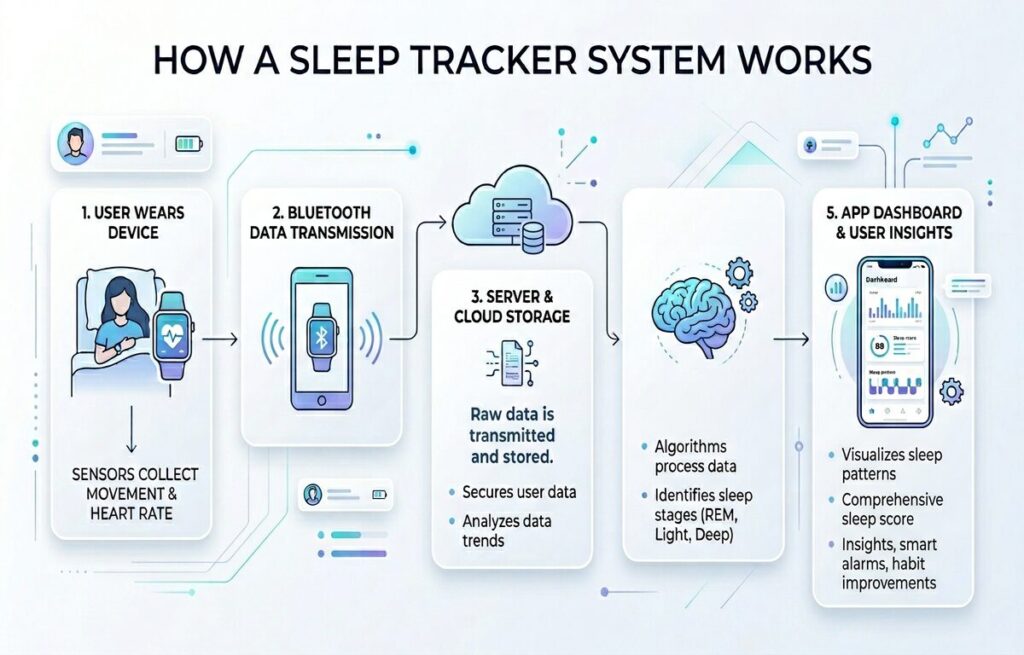
What Smart Features in Sleep Trackers Really Do
Many companies market sleep trackers as intelligent wellness systems.
That sounds impressive, but most smart features fall into two simple categories:
- Features that improve data collection
- Features that improve convenience
Those are not the same thing.
A tracker with excellent connectivity does not automatically produce better sleep insights. And a device with fewer smart features can still provide more reliable sleep tracking.
Connectivity vs Tracking
Bluetooth, WiFi, cloud sync, and app integrations are connectivity features.
Heart rate tracking, movement analysis, respiratory monitoring, and sleep stage estimation are tracking features.
Companies often blur the line between them.
For example, a smartwatch might advertise advanced AI sleep insights, but the actual accuracy still depends mostly on basic sensors like accelerometers and optical heart rate monitoring.
The smart layer sits on top of the tracking layer.
That means more apps or more automation do not automatically equal better sleep analysis.
Convenience vs Real Value
Convenience matters.
Automatic syncing is useful.
Easy app access is useful.
Reliable battery life matters.
But some features exist mainly for differentiation.
Do you really need voice commands to check your sleep score?
Does your sleep tracker need to connect to your lights?
Probably not.
This is where many users get distracted.
A feature can feel advanced without actually improving your sleep.
Why This Matters
Smart features became popular because companies shifted from simple trackers to full ecosystems.
That includes apps, cloud dashboards, recovery scores, and AI recommendations.
Some of this is useful. Some of it creates unnecessary complexity.
There’s even a term for overanalyzing sleep data: orthosomnia.
So while smart features can improve awareness, they can also increase pressure if you rely on them too much.
What this means in practice:
The best smart features reduce friction and make tracking easier. The rest often add noise without improving results.
Core Smart Features Explained
Bluetooth Connectivity
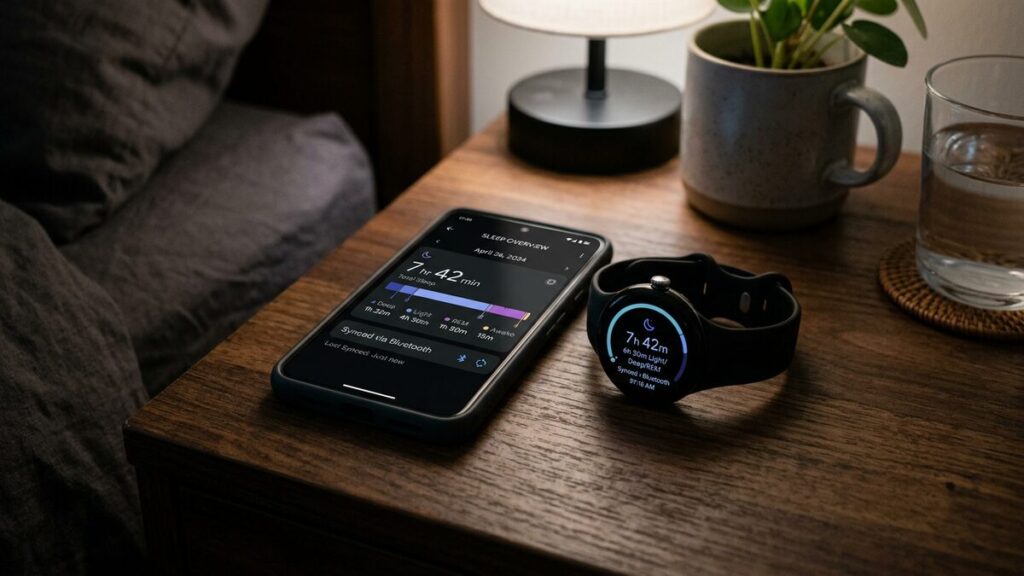
Bluetooth is the foundation of most modern sleep trackers.
Without it, your device would not communicate easily with your phone, which means no automatic data syncing or app integration.
What Bluetooth Actually Does
Bluetooth allows your device to:
- Sync sleep data to an app
- Transfer firmware updates
- Connect with companion devices
- Send notifications
- Pair with accessories like headphones
Most sleep trackers use Bluetooth Low Energy (BLE).
That matters because constant wireless syncing can drain battery life. BLE reduces that impact and allows devices to sync efficiently in the background.
When Bluetooth Helps
Bluetooth is genuinely useful because it makes syncing automatic.
You wake up, open the app, and your sleep report is already there.
That convenience increases consistency, which is critical for long-term sleep tracking. A tracker you stop using becomes worthless, regardless of its features. This is where overall device quality matters, which we compare in our best sleep trackers guide.
Where It Falls Short
Bluetooth is not perfect.
Common issues include:
- Sync failures
- Connection drops
- Battery drain
- App pairing frustrations
- Background permission problems
Some lower-cost devices also struggle with stable connections.
Another overlooked issue is dependency on the app. Many trackers become significantly less useful without their companion app, which means the hardware alone is not the full product.
Does Bluetooth Improve Sleep Tracking Accuracy?
No.
Bluetooth improves convenience, not tracking precision.
A device can have flawless connectivity and still produce poor sleep estimates. Accuracy depends on sensors and algorithms, not how well the device connects.
WiFi Sync
WiFi syncing is less common than Bluetooth, but higher-end sleep trackers and smart sleep systems are starting to use it more often.
What WiFi Sync Does
WiFi allows a sleep tracker to:
- Upload data directly to cloud servers
- Sync without needing your phone nearby
- Process larger data sets more efficiently
- Enable remote access to reports
- Support smart home automations
Some bedside or non-wearable sleep monitors rely heavily on WiFi because they continuously upload data throughout the night.
When WiFi Is Actually Useful
WiFi becomes more useful if you:
- Use multiple devices in one ecosystem
- Want automatic cloud backups
- Track sleep across different devices
- Share health data with providers
- Use advanced analytics platforms
For most users, Bluetooth alone is usually enough.
The Tradeoff Most People Ignore
WiFi introduces a larger privacy footprint.
That deserves attention.
Sleep data is deeply personal, as highlighted by the Sleep Foundation. Your sleep patterns, stress levels, breathing irregularities, and recovery trends can reveal a lot about your lifestyle.
Most users never read privacy policies carefully. That’s a mistake.
Before choosing a cloud-connected sleep tracker, ask:
- Where is your data stored?
- Is it encrypted?
- Can you delete your history permanently?
- Does the company share or sell aggregated data?
- What happens if your subscription ends?
Does WiFi Improve Sleep Tracking Accuracy?
No.
WiFi improves how your data is stored and accessed, not how it is measured.
A device can sync perfectly to the cloud and still rely on the same underlying sensors and algorithms for sleep tracking.
App Integration
The app often determines whether a sleep tracker feels useful or frustrating.
In sleep trackers with smart features, the app experience often matters more than hardware.
What Sleep Tracker Apps Usually Include
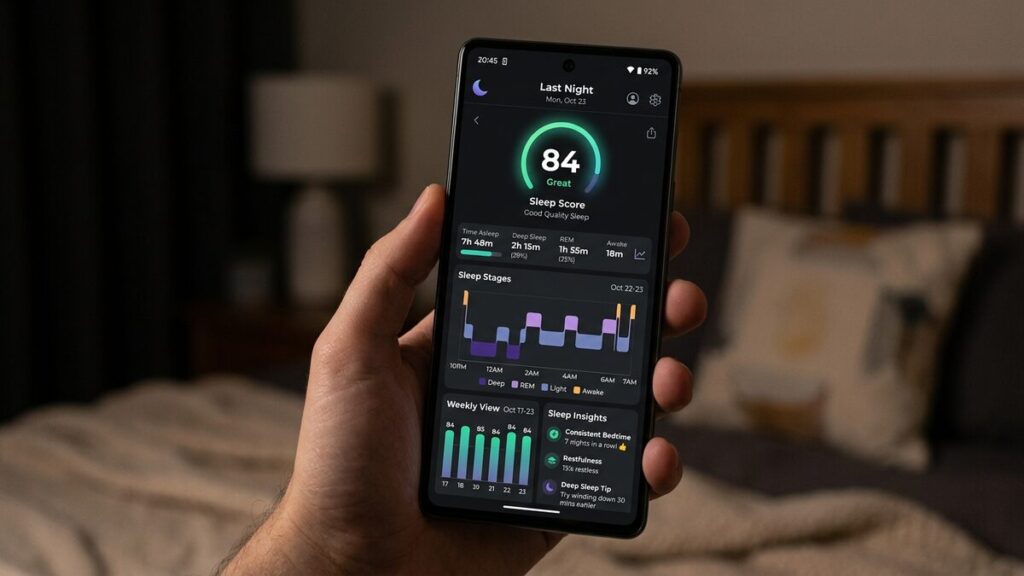
Most apps provide:
- Sleep duration reports
- Sleep stage graphs
- Heart rate trends
- Sleep scores
- Recovery metrics
- Habit tracking
- Smart alarms
- Coaching insights
- Meditation or relaxation content
Some apps present this information clearly. Others hide useful data behind subscriptions or unnecessary complexity.
Good App Design vs Bad App Design
A good sleep app answers simple questions:
- How long did you sleep?
- How consistent is your schedule?
- Are your habits improving?
- What factors are affecting your recovery?
A bad app overwhelms you with too many metrics and unclear scores.
Here’s the real issue.
Many apps generate large amounts of data but provide very little clarity. Data alone is not insight. Insight requires interpretation. To understand how this data is actually analyzed, see sleep tracker sleep analysis.
Subscription Fatigue Is Real
Many sleep tracker companies now lock advanced features behind subscriptions.
That changes the real cost of ownership.
A device that seems affordable upfront can become expensive over time.
Common examples include:
- Sleep coaching programs
- Advanced readiness scores
- Long-term trend reports
- AI-based analysis
- Cloud data access
Before buying, it’s worth calculating the total cost, not just the device price.
Does App Integration Improve Sleep Tracking Accuracy?
No.
App integration improves how your data is displayed and interpreted, not how it is measured.
A well-designed app can make your data more useful, but it cannot fix poor tracking accuracy.
Voice Control
Voice assistant integration sounds futuristic, but its real usefulness is limited for most users.
What Voice Control Can Do
Some sleep trackers connect with:
- Amazon Alexa
- Google Assistant
- Apple Siri
This allows commands such as:
- Start sleep mode
- Read sleep summaries
- Adjust alarms
- Trigger bedtime routines
- Control connected devices
Is Voice Control Actually Helpful?
Sometimes, but usually less than marketing suggests.
Most people interact with sleep trackers through apps, not voice assistants.
There’s also a practical issue.
Sleep environments are supposed to reduce stimulation. Adding more interaction, especially voice-based, can work against that goal. The more technology surrounds bedtime, the harder it can be to disconnect mentally.
That doesn’t mean voice features are useless.
They can be helpful for users with accessibility needs or those who already rely on smart home systems.
Where It Falls Short
For most users, voice control is rarely a deciding factor when choosing a sleep tracker.
It adds convenience in specific situations, but it doesn’t meaningfully improve the overall sleep tracking experience.
Does Voice Control Improve Sleep Tracking Accuracy?
No.
Voice control affects how you interact with the device, not how your sleep is measured.
Smart Home Integration
This is where sleep tracking overlaps with automation.
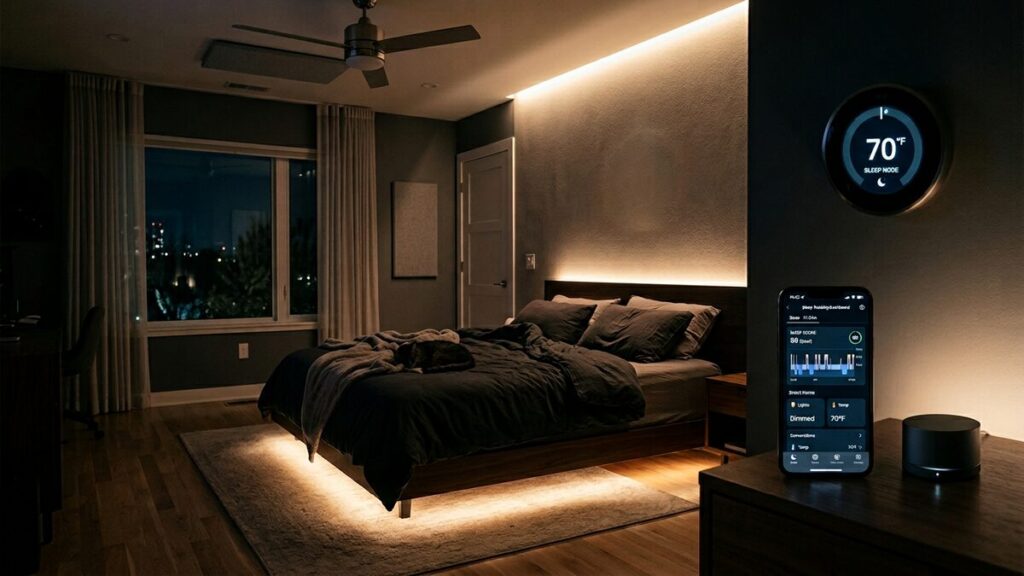
Some sleep trackers and systems can interact with:
- Smart lights
- Thermostats
- Curtains
- White noise machines
- Mattresses
- Air purifiers
The Best Use Cases for Smart Home Sleep Features
The strongest smart home integrations support sleep environment consistency.
For example:
- Dimming lights at bedtime
- Lowering room temperature automatically
- Turning off distractions
- Starting white noise
- Gradually brightening lights in the morning
These changes can genuinely support better sleep habits, especially for people who struggle with maintaining a consistent routine.
Where Smart Home Features Become Excessive
Some integrations solve problems most people don’t actually have.
You don’t need a fully automated bedroom to sleep well. In some cases, too much automation can become distracting rather than helpful.
There’s also a tendency to over-optimize.
Many people improve their sleep more from basic changes:
- Going to bed at a consistent time
- Reducing caffeine intake
- Limiting screen exposure before bed
- Improving mattress and pillow support
- Keeping the room cool
These fundamentals usually matter more than advanced automation.
Does Smart Home Integration Improve Sleep Tracking Accuracy?
No.
Smart home features can improve your environment, but they do not improve how your sleep is measured. Tracking accuracy still depends on sensors and algorithms, not automation.
Which Smart Features Actually Matter
This is the point where most buyers stop caring about marketing and start asking a simple question:
Which features actually make a difference?
Because not all smart features deliver real value. Some improve your experience. Others mostly exist to justify higher prices.
Here’s how to tell the difference.
Features That Usually Matter
These are the features most users benefit from over the long term.
Reliable Automatic Syncing
A sleep tracker should make data collection effortless.
If syncing fails or requires constant manual reconnecting, most users eventually stop checking their sleep data. And once that happens, the tracker loses its value.
Consistency depends on convenience.
Clear and Useful App Design
A good app turns raw data into clear answers.
You should be able to quickly understand:
- Did you sleep enough?
- Is your schedule consistent?
- Are your habits improving?
- What patterns keep repeating?
If the app hides insights behind complex graphs or vague wellness scores, the experience becomes frustrating instead of helpful.
Long Battery Life
This is often underestimated.
A device that needs frequent charging creates friction. Missed nights of tracking weaken your data and make long-term patterns harder to trust.
Comfortable Design
Comfort directly affects consistency.
If a device feels bulky or distracting, you’re less likely to wear it consistently. That’s one reason smaller devices like rings have gained popularity.
Less friction usually leads to better long-term use.
Trend Analysis
Single-night sleep scores are often overrated.
What matters is how your sleep changes over time. Good trackers help you identify patterns across weeks and months instead of reacting to one bad night.
That approach is both more useful and less stressful.
| Feature | Best For | Usefulness | Key Benefit |
| Bluetooth Sync | All users | High | Automatic and reliable data syncing |
| App Integration | Daily tracking | High | Clear insights and easy data access |
| WiFi Sync | Advanced users | Medium | Cloud backup and remote access |
| Smart Home Integration | Routine-focused users | Medium | Automates sleep environment |
| Voice Control | Accessibility needs | Low | Hands-free control and commands |
Features That Matter for Specific Users
Some features are useful, but only in certain situations.
Recovery Scores for Athletes
For people who train regularly, recovery tracking can help identify fatigue and adjust intensity.
For casual users, these metrics often don’t lead to meaningful changes.
Smart Home Integration
Automation can support better routines.
For example:
- Lights dim automatically
- Room temperature adjusts
- White noise starts
- Morning lights gradually brighten
That can help some users build consistency, but it’s not essential. Basic habits still matter more.
Voice Control
Voice features sound impressive, but most users rarely use them after the novelty fades.
Checking data through an app is usually faster. Voice control is more useful for accessibility than everyday sleep tracking.
Features That Often Matter Less Than Advertised
This is where marketing tends to exaggerate value.
These features often sound impressive but add little in practice:
- Social sleep sharing
- Gamified achievement badges
- AI-generated “sleep personalities.”
- Constant readiness notifications
- Overcomplicated dashboards
- Excessive coaching prompts
Many apps are designed to increase engagement, not clarity.
That distinction matters.
Too many alerts and metrics can actually make sleep tracking more stressful instead of helpful.
Bottom line:
The best smart features reduce friction and improve awareness. The worst ones create distraction and unnecessary complexity.
When Smart Features Are Useful (and When They’re Not)
Smart features in sleep trackers with smart features are tools.
For a deeper breakdown of core tracking features, see sleep tracker features.
And like most tools, their value depends on how people actually use them, not how they imagine using them.
That difference matters more than most buyers expect.
When Smart Features Are Useful
When You Need Better Sleep Consistency
Automated reminders, bedtime routines, and passive tracking can help people with irregular schedules.
The less effort required, the more likely habits stick.
When You Already Use Health Ecosystems
If you already use connected apps, fitness trackers, or health dashboards, integration becomes genuinely useful.
Everything works together more smoothly.
When You Want Long-Term Pattern Awareness
Good sleep tracking helps you notice trends you would otherwise miss.
For example:
- Poor sleep after late caffeine
- Inconsistent weekend schedules
- Stress-related disruptions
- Recovery changes during training cycles
That kind of awareness improves decision-making over time.
When You Prefer Passive Tracking
Some users benefit from systems that work quietly in the background.
No manual logging. No constant input. Just consistent data collection and occasional insights.
When Smart Features Become Less Useful
When You Obsess Over Sleep Scores
This is more common than people think.
Some users become anxious after seeing low scores, even when they feel fine. That can create an unhealthy relationship with sleep tracking.
There’s even a term for this: orthosomnia.
The irony is clear. Technology designed to improve sleep can sometimes increase stress.
When You Constantly Check Metrics
Sleep naturally varies. Not every change is meaningful.
Overanalyzing daily fluctuations often creates confusion instead of clarity.
When You Already Sleep Well Naturally
Not everyone needs advanced tracking.
Many people with healthy sleep habits gain very little from complex analytics, even though this is rarely emphasized in marketing.
When You Dislike Subscriptions
Many advanced features now require monthly subscriptions.
For some users, that’s worth it. For others, the value drops quickly after the initial novelty fades.
The Real Question to Ask
Instead of asking:
“What’s the smartest sleep tracker?”
Ask:
“Which features will I realistically use consistently?”
That question leads to much better decisions than any feature list.
Best Sleep Trackers With Smart Features
Different users need different types of smart features.
There is no single “best” device. The right choice depends on your priorities, including comfort, ecosystem compatibility, recovery tracking, battery life, and budget.
Best for Apple Ecosystem Users
The Apple Watch Series 10 works best for people already deeply integrated into the Apple ecosystem.
Strengths:
- Excellent app ecosystem
- Strong smart home support
- Smooth iPhone integration
- Reliable notifications
- Broad health tracking features
Limitation:
Battery life remains a weakness. Frequent charging can interrupt consistent overnight tracking.
Best for Recovery and Performance Tracking
The WHOOP 5.0 focuses heavily on recovery analytics, strain tracking, and long-term physiological trends.
It’s especially appealing for athletes and performance-focused users.
Strengths:
- Continuous recovery insights
- Strong coaching system
- Detailed physiological tracking
Limitation:
The subscription model is the biggest tradeoff. Some users value the insights, while others dislike ongoing monthly costs.
Best for Minimalist Sleep Tracking
The Oura Ring 4 stands out for its low-friction design.
The ring form factor feels less intrusive than a smartwatch, which often improves consistency.
Strengths:
- Comfortable for overnight wear
- Strong recovery insights
- Clean, focused app experience
Limitation:
Limited real-time interaction and no screen-based controls.
Best for Fitness-Focused Users
The Garmin Venu 3 works well for users who want to combine fitness tracking with sleep analysis.
Strengths:
- Strong battery life
- Reliable fitness metrics
- Recovery and training insights
- Detailed physiological data
Limitation:
The interface can feel complex for beginners.
Best Budget-Friendly Option
The Fitbit Charge 6 offers one of the most accessible entry points for casual users.
Strengths:
- User-friendly sleep reports
- Solid app experience
- Basic smart features
- Reasonable battery life
- Affordable pricing
Limitation:
Less advanced analytics compared to premium devices.
Which Type of Device Makes the Most Sense?
A simple way to think about it:
- Smartwatches → best for all-around functionality
- Smart rings → best for comfort and passive tracking
- Fitness bands → best for affordability
- Recovery-focused wearables → best for athletes
- Bedside monitors → best for users who don’t want to wear a device
The “best” sleep tracker depends less on specifications and more on whether it fits naturally into your routine.
That matters more than most comparison charts suggest.
Common Mistakes to Avoid
Many people buy sleep trackers for the wrong reasons.
That often leads to wasted money, abandoned devices, and unrealistic expectations.
Here are the most common mistakes.
Buying Based on Features Instead of Habits
Many users choose devices with the longest feature lists.
But in practice, they end up using only basic sleep tracking.
A simpler tracker you use consistently is usually more valuable than an advanced system you stop using after a few weeks.
Ignoring Comfort
This is one of the most overlooked factors.
If a device feels uncomfortable at night, usage drops quickly.
Comfort directly affects consistency, and without consistent use, the data becomes meaningless.
Treating Sleep Scores Like Medical Truth
Consumer sleep trackers are not medical devices.
They estimate sleep patterns using algorithms and sensor data, which means occasional inaccuracies are normal.
Sleep stage breakdowns, in particular, should not be treated as clinical results.
Obsessing Over Daily Fluctuations
One bad night of sleep does not mean something is wrong.
Sleep naturally varies due to stress, diet, exercise, illness, travel, and other factors.
Long-term trends matter far more than individual nights.
Ignoring Privacy Policies
Sleep data is deeply personal.
Yet many users upload sensitive information without checking:
- How data is stored
- Whether data is shared
- What happens after subscription cancellation
- Whether accounts can be deleted fully
Convenience should not override privacy awareness.
Paying for Features You Will Never Use
This happens more often than people expect.
If you never use smart home automation, voice assistants, or advanced coaching systems, paying extra for them adds little value.
Marketing often sells an ideal version of how you might use a device, not how you actually will.
That distinction matters.
Frequently Asked Questions
Do smart features improve sleep tracking accuracy?
Usually no.
Most smart features improve convenience and automation, not tracking precision. Accuracy depends more on sensor quality and algorithms.
Is Bluetooth enough for sleep tracking?
For most users, yes.
Bluetooth handles syncing and app connectivity effectively without needing constant WiFi access.
Are smart sleep trackers worth the money?
They can be.
The value depends on whether the device improves awareness or habits over time. A tracker that increases consistency can be worth it. One that creates stress usually is not.
Which smart feature matters most?
For most users, the basics matter more:
- Reliable syncing
- Good battery life
- Comfortable design
- Clear trend analysis
These are more important than advanced or flashy features.
Can sleep trackers diagnose sleep disorders?
No.
Consumer sleep trackers can highlight unusual patterns, but they cannot diagnose medical conditions. Proper testing is required for diagnosis.
Are subscription-based sleep trackers worth it?
Sometimes.
Athletes and data-focused users may benefit from deeper analytics. Casual users often find they use only a small portion of paid features.
Do smart home sleep features actually help?
They can support better routines by automating lighting, temperature, and bedtime environments.
However, basic sleep habits still matter more than automation.
Is more sleep data always better?
Not necessarily.
More data can improve awareness, but it can also create confusion if overanalyzed. Good sleep tracking should simplify decisions, not overwhelm you.
Final Thoughts
Smart features in sleep trackers are neither pointless nor revolutionary.
Some genuinely improve convenience and consistency. Others exist mainly to make devices feel more advanced than they actually are.
That distinction matters because sleep tracking is ultimately about behavior, not technology.
A tracker cannot create good habits on its own. It cannot replace consistency, discipline, or a healthy routine.
What it can do is reduce friction, increase awareness, and help you notice patterns you might otherwise ignore.
That’s where the real value lies.
The best sleep trackers are not the ones with the most features. They are the ones you actually keep using.
In many cases, simpler systems win because they create less distraction and less pressure.
The bottom line:
Technology should support healthy sleep habits, not become another source of stress.
If a feature helps you sleep better consistently, it’s valuable. If it adds noise, anxiety, or dependency, it probably isn’t.

A passionate tech blogger and the founder of Best Tech View, a dynamic platform dedicated to all things technology. With a keen interest in the tech, Ahmad strives to provide insightful and engaging content on the latest tech trends, and breakthroughs.

